Time Cut
Advertisement
Apps Overview
Discover Time Cut Pro APK, the powerful slow motion, motion blur, and frame rate conversion app using AI interpolation for smooth, cinematic, high-quality video edits.
- Pro Unlocked
Table of Contents
Time Cut APK: Smooth Slow Motion, Motion Blur & Frame Rate Converter
In today’s fast-paced world of video creation, the ability to precisely control time inside a video is one of the most powerful storytelling techniques. Whether you are a professional videographer, a mobile creator on TikTok or Instagram, or simply someone who wants to transform everyday footage into dynamic highlights, a powerful speed-adjustment and frame interpolation tool can completely change the quality of your content. Time Cut APK is one of the most advanced apps in this niche, offering deep-learning-powered slow motion, optical-flow motion blur, high-frame-rate conversion, and a vast range of velocity editing options that rival professional desktop plugins.
Time Cut is specifically designed to help users create ultra-smooth slow motion (slopro), dynamic velocity edits, cinematic motion blur, and highlight moment effects all from a mobile device. Using advanced technologies such as Optical Flow and the RIFE deep-learning model, the app can generate new frames between existing ones, giving video motion an incredibly natural, fluid appearance. It works similarly to professional plugins such as Twixtor or RSMB, but in an accessible and mobile-optimized form.
What Makes Time Cut Unique?
Time Cut stands out from other mobile editors due to its focus on speed manipulation and quality enhancement. Instead of trying to do everything, it specializes in producing buttery-smooth time effects through advanced computational video processing. Below are some core reasons why it has become so popular:
- Deep-Learning Motion Interpolation: Most ordinary video editors simply slow down footage by repeating frames or blending them, which often results in choppy or ghosting effects. Time Cut uses a deep-learning model called RIFE (Real-Time Intermediate Flow Estimation), which artificially creates brand-new in-between frames. This results in realistic slow motion even when starting with a low-FPS source.
- Professional Motion Blur Comparable To RSMB: Creators who work with Adobe After Effects know how essential RSMB (ReelSmart Motion Blur) is for achieving cinematic motion blur. Time Cut offers a mobile alternative by using optical-flow-based motion vector calculations to produce accurate directional blurring.
- Frame Rate Conversion From 1 to 240 FPS: Few mobile apps allow genuine frame rate conversion. Time Cut can increase footage from 30 FPS to 60, 120, or even 240 FPS or convert high-FPS clips down to more cinematic frame rates like 24 or 30 FPS.
- Speed Curve And Velocity Edits: Velocity edits with smooth waves of slow and fast motion have become a major trend on TikTok, Reels, and Shorts. Time Cut’s speed curve editor allows creators to draw custom timing paths that control exactly how fast motion accelerates or decelerates.
- Highlight Effects And Creative Transitions: From zoom pulses to glitter flashes and VSCO-like filters, the app includes multiple cinematic highlight effects designed to match beats in music and emphasize motion.
Advertisement
Features Of Time Cut
Advanced Speed Curve & Smooth Slow Motion Editor
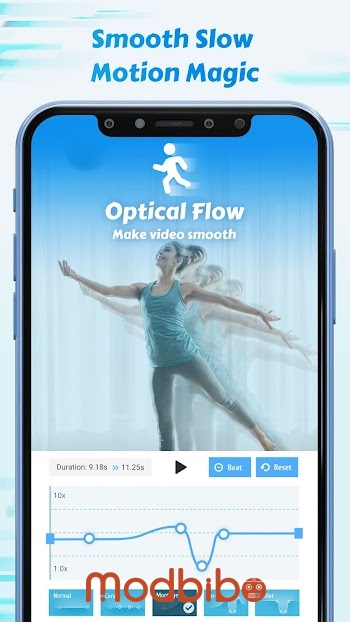
Understanding The Speed Curve Interface
The speed curve editor is at the heart of what makes Time Cut so powerful. Instead of using fixed presets, users can craft complex motion patterns:
-
slow → fast → slow
-
fast → freeze → slow
-
gradual dips and rises based on music rhythms
-
dramatic slowdowns during action highlights
With the help of AI-generated frames, the video remains smooth even when sped up or slowed down dramatically.
Creating Ultra Slow Motion
Time Cut supports slow motion down to 1/10x, making it possible to freeze an exact moment such as:
-
a dancer flipping their hair
-
a ball flying through the air
-
a skateboarder performing a trick
-
a water splash in mid-air
Unlike standard phone slow motion where high FPS hardware is required Time Cut can take a regular 30 FPS video and transform it into silky slow motion through frame interpolation.
Fast Motion And Hyperlapse
In addition to slowing footage down, Time Cut is also highly effective at speeding clips up:
-
fast forward up to 10x
-
create timelapse-style sequences
-
produce hyperlapse-like effects for travel videos
Because the speed changes remain smooth throughout, transitions between slow and fast segments feel polished and cinematic.
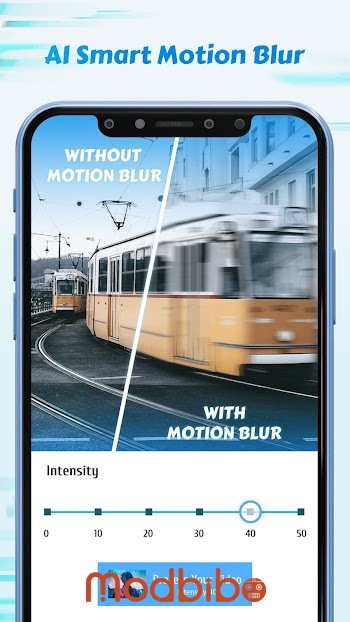
Motion Blur Effects Using Optical Flow
Motion blur is an essential part of making footage look natural and professional. It can simulate real camera movement or enhance the sense of speed and direction.
Types Of Motion Blur Available
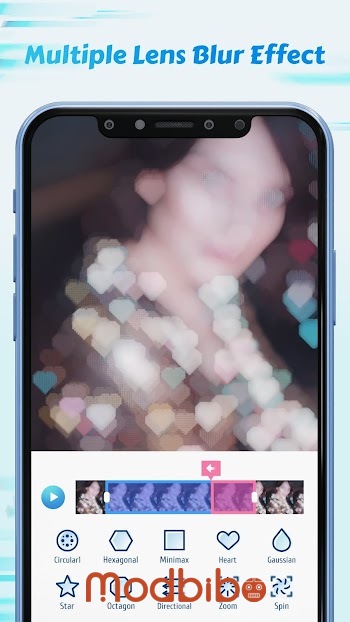
Time Cut incorporates several blur styles inspired by professional desktop effects:
-
Optical Flow Motion Blur: smooth, directional blur calculated using motion vectors
-
BCC Lens Blur: a stylish circular blur used for transitions
-
Directional Blur: highlights linear movement in a chosen direction
These effects are particularly useful when working with:
-
velocity edits
-
action scenes
-
dance transitions
-
sports replays
-
creative TikTok edits
By combining motion blur with slow motion, creators can achieve ultra-cinematic results without needing After Effects or Premiere.
Frame Rate Converter
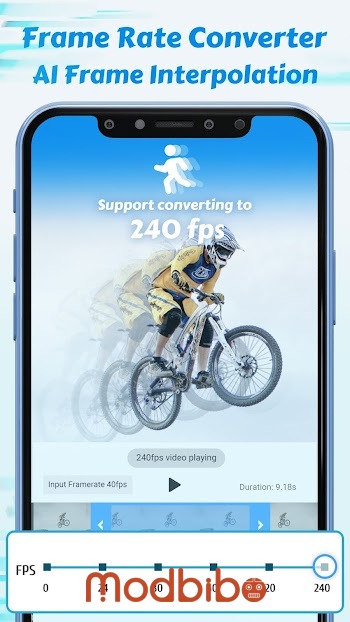
One of the standout features of Time Cut APK is its ability to convert frame rates. This is more than simple playback adjustment it involves generating or removing frames depending on the target FPS.
Increasing Frame Rate (HFR Conversion)
Time Cut can upscale footage from lower frame rates to higher ones such as:
-
60 FPS
-
120 FPS
-
240 FPS
High-frame-rate videos are ideal for:
-
slow motion
-
gaming clips
-
action sports
-
drone footage
-
cinematic edits
Even with a normal 30 FPS or 24 FPS video, Time Cut can calculate intermediate frames to produce smooth HFR output.
Decreasing Frame Rate For Cinematic Aesthetics
On the other hand, some creators prefer the filmic look of 24 FPS. Time Cut enables high-FPS clips such as 120 FPS or 240 FPS to be converted down to:
-
24 FPS, the cinematic standard
-
30 FPS, common for social media
This reduces file size and gives videos a pleasing, natural cadence.
Quality Enhancer
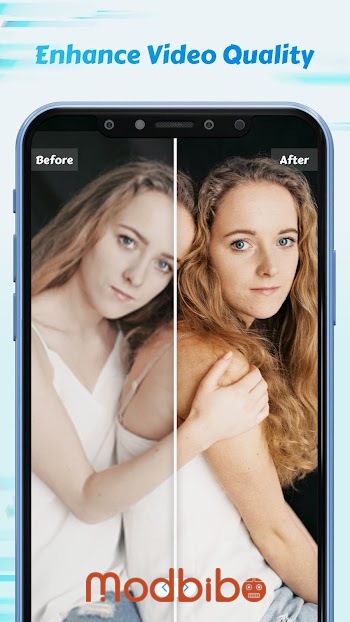
Time Cut includes an AI-powered Quality Enhancer that analyzes and improves video clarity. This is particularly helpful when dealing with older clips, low-light footage, or videos compressed by social media apps.
What The AI Enhancer Can Improve
-
sharpness and detail
-
color vibrancy
-
noise reduction
-
correction of blurry sections
-
overall HD/Full HD appearance
By combining the quality enhancer with speed editing, creators can upgrade their raw clips into professional-grade content.
Highlight Moments Effects
Highlight Moments are preset editing effects designed to emphasize important parts of your footage. Many of these are inspired by trending effects on TikTok and Instagram.
Types Of Effects Included
-
glitter and sparkle effects
-
zoom punches and zoom pulses
-
flashy lights
-
VSCO-style filters
-
rhythmic strobe patterns
-
flash transitions synced with beats
Most highlight effects require only two steps:
-
Select a highlight type
-
Mark the moment on the timeline
The app then automatically generates a polished sequence that blends perfectly with the rest of the footage.
Creative Applications Of Time Cut
For Social Media Creators
Time Cut is widely used for TikTok and Instagram edits due to its ability to create velocity motion and beat-synced highlights. Some popular uses include:
-
slow motion dance videos
-
aesthetic Reels with smooth speed transitions
-
beauty shots with soft motion blur
-
dramatic cinematic cuts for travel content
Advertisement
For Sports And Action Shots
Slow motion is essential for sports analysis and highlight reels. Time Cut can help capture:
-
basketball dunks
-
skateboarding tricks
-
surfing footage
-
parkour flips
-
football goals
The combination of slow motion and motion blur makes every action moment more dramatic.
For Everyday Fun Clips
Even basic daily moments can become eye-catching content:
-
jumping shots
-
blowing bubbles
-
water balloon bursts
-
pets running
-
funny movement sequences
Clips can even be exported as GIFs for sharing on messaging apps.
For Professional Filmmakers And Editors
While Time Cut is a mobile app, its AI-powered tools can serve as a supplement to professional workflows. It can:
-
pre-process footage for higher FPS
-
generate smooth slow motion for B-roll
-
create motion blur for VFX sequences
-
assist with conforming frame rates
For creators on the move, it provides a portable alternative to desktop plugins.
How Time Cut Stands Against Desktop Tools
Many compare Time Cut to desktop legends like Twixtor and RSMB. While desktop plugins still offer more manual control, Time Cut delivers impressive results with much greater accessibility.
Advantages Of Time Cut
-
mobile and easy to learn
-
AI-powered automation
-
simple interface
-
fast processing
-
rich presets
-
integrated velocity editing tools
Limitations
-
not ideal for very complex scenes with overlapping motion
-
extremely low-resolution footage may interpolate poorly
-
advanced color grading still requires external software
Despite these limitations, Time Cut is arguably one of the most powerful mobile interpolation tools available today.
Why Time Cut APK Has Become A Top Choice
The popularity of Time Cut APK comes from the combination of its simplicity and performance. It brings advanced technology once limited to professional studios into an app that anyone can use. Whether you want a cinematic look, viral TikTok velocity edits, or buttery smooth slow motion, Time Cut provides the tools.
Key reasons for its rise:
-
deep-learning interpolation
-
high-quality optical flow
-
versatile speed curve
-
motion blur effects
-
HFR conversion
-
creative highlight presets
-
AI quality enhancement
All of this makes it a go-to solution for content creators of all skill levels.
Conclusion
Time Cut is one of the leading mobile apps for speed editing, motion interpolation, slopro creation, and frame rate conversion. With tools powered by Optical Flow and the deep-learning RIFE model, it allows users to transform ordinary footage into stunning slow motion, fast motion, and highlight-focused edits. Whether you’re a TikTok creator, filmmaker, sports enthusiast, or casual editor, Time Cut APK offers everything you need to craft smooth and cinematic videos right from your phone.
Its unique combination of velocity control, creative effects, motion blur, and AI quality enhancement sets it apart from everyday video editors. By putting professional-grade computational video tools into a simple and intuitive mobile interface, Time Cut empowers anyone to play with time and bring their creative vision to life.
If you need a flexible, powerful, and modern tool to create smooth slomo, HFR videos, velocity edits, motion blur effects, or stylish highlight moments, Time Cut remains one of the best options available.